You're reading an older article from ELECTRICAL CONTRACTOR. Some content, such as code-related information, may be outdated. Visit our homepage to view the most up-to-date articles.
As estimators, we are sometimes called on to create and maintain schedules. Many of us actually hold the position of estimator/project manager, so we are wholly responsible for scheduling our own projects.
Some people do not believe creating a schedule is necessary; they find it a waste of time. However, in my early days as an estimator, I learned managing by reaction is never a good thing. Eventually, I went to work for a man who was interested in scheduling. He asked me to look into scheduling software. I ended up recommending a software package from Symantec called Timeline. The purchase was made, the software was installed, and I was immediately hooked.
The systems
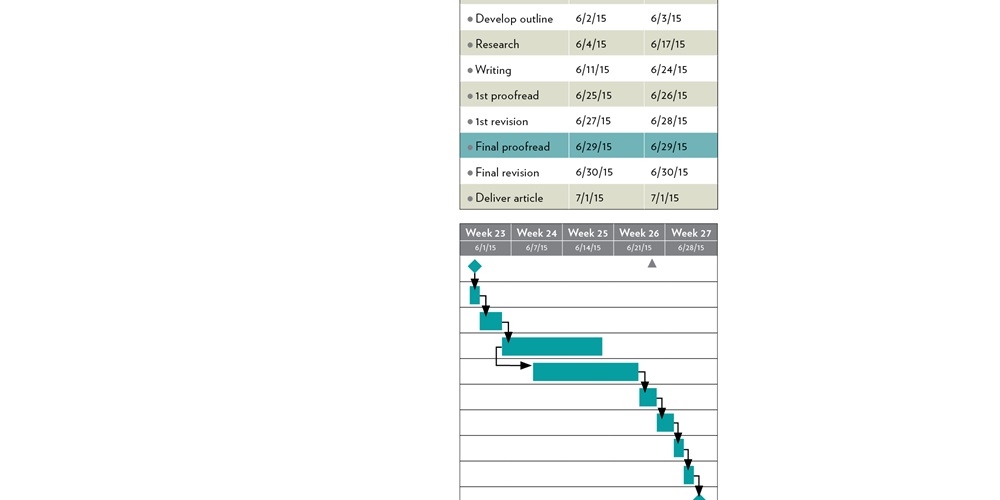
I use three different, but related, systems to schedule my projects: Gantt charts, project evaluation and review technique (PERT) charts, and the critical path method (CPM). (The sample chart above shows an article for this magazine being scheduled.) If you are unfamiliar with these charts, I suggest looking them up online.
Used on most projects, Gantt bar charts were developed by Henry Gantt around 1910–1915 to illustrate a schedule.
Working with the U.S Navy, government contractor Booz Allen Hamilton developed the PERT chart in the 1950s. PERT charts represent projects as a network diagram and are a statistical technique for measuring and forecasting progress in a project.
Developed in the late 1950s by Morgan Walker of DuPont and James Kelley of Remington Rand, CPM is a method of analyzing schedules.
The tasks
I like to start with a Gantt chart. I create a list of tasks that represent portions of the work. There are several types of tasks, including milestone, fixed date and floating. A milestone has a fixed date, but no duration, and is used for events like a notice to proceed, start date and completion date. Fixed date tasks have a duration—such as 10 hours, two weeks or five months—and are given start and finish dates. The floating task should be used most often; it has a duration but no fixed dates. The dates will be dependent on other tasks in the schedule. Although you could simply create tasks with firm dates, you should not, because the full power of these charts is not realized until you create dependencies between (or link) floating tasks.
Dependencies are logical relationships between tasks. For example, after the ceiling grid is finished, install the lighting fixtures. That is a finish-start dependency, which is the dependency used most often. Another important dependency is the finish-start plus a lag. For instance, release the switchgear for manufacturing, add eight weeks and start the task, then install the switchgear. The eight-week lag is the time it takes the manufacturer to make and deliver the switchgear.
The logic
Once all of my tasks and links are created, I like to switch to the PERT view of the schedule. The U.S. Navy developed PERT for the construction of the Polaris submarine, and it is meant to be used on large, complex projects where the completion date is more important than the cost. In spite of PERT’s impressive lineage, I like to use it on small and large projects to study the schedule and troubleshoot linking mistakes. Once I’m finished with the PERT chart, it’s time to pay attention to the critical path.
CPM uses the list of tasks, durations and dependencies to calculate the longest path to the end of the project. Any task that would affect the project completion date if delayed is put on the “critical” path. Other tasks that can be delayed without affecting the completion date are considered to have “float.” This is a great tool for managing workflow and knowing when certain tasks must be completed and when they can be postponed.
My observations of projects with scheduling problems revealed many suffered from late delivery of long-lead materials. As a result, I like to start my schedules with procurement because I want to know when my long-lead items will be delivered before moving on to the rest of the schedule. After procurement is done, it is time to study the general contractor’s schedule, looking for conflicts and other problems. If a problem is found, work that part of the schedule first. Beyond that, it is up to you how detailed you want to make your schedule. Remember, a complex schedule is more difficult to keep up-to-date.
Next month, we will explore constraints, resources and calendars.
About The Author

CARR has been in the electrical construction business since 1971. He started Carr Consulting Services—which provides electrical estimating and educational services—in 1994. Contact him at 805.523.1575 or [email protected], and read his blog at electricalestimator.wordpress.com.