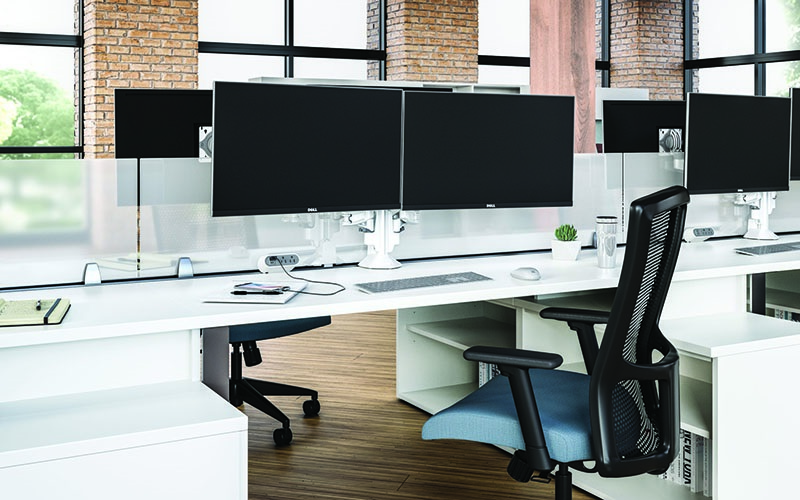
Convenience power isn’t new, but it is even more available. Look no further than the modern office desktop. It’s a workspace tailored to meet users’ needs and expectations. Such powered workstations are clean, adaptable and worker-friendly, whether in an office, college classroom or healthcare setting. For the electrical contractor, working out the design and installation of convenience power spaces requires continued conversation with the customer, problem-solving and discovering the latest in electrical and digital wiring, with much of it quickly becoming a world of snap-together and plug-and-play power.
Safety drove many of the first forays into convenient power, including GFCI outlets designed to protect against electrical shock by shutting off power during a ground fault, AFCI outlets to detect arcing and help prevent electrical fires, and surge protection outlets. Tamper-resistant outlets brought in a new level of safety. These advances opened the door to more end-user convenience, including USB outlets, and now today’s smart outlets and wireless light switches are controlled remotely through a smartphone or voice command. Some are even able to monitor energy consumption. What seems common today was once revolutionary, and development isn’t finished.
Today’s advancements have been formed with the installer and end-user in mind. A few areas include bundling power and data, improvements with floor boxes, poke-thru devices and raceways (some featuring modular prewiring accommodating data and power), flexible wall and floor design, and floor systems that can include duct systems. Each advancement allows the electrical contractor, in concert with IT personnel, an easier path to modular power and the new work desk.
Phillip Ruffy is associate product manager for furniture power at Legrand, West Hartford, Conn., a global company and manufacturer of products serving electrical and digital infrastructures for power, light and data. He explained what installers must consider in offices and other spaces designed for convenience power.
“Offices are being designed to include more co-working spaces and pods of desks that will need power," Ruffy said. “You might be working on pods of four desks, eight desks or more working with power draw limited by the electrical code. You have a certain number of outlets that you’re feeding to these desks. You want to keep it manageable. When you start adding under-desk power, a sit/stand desk system and then various convenience power on the desktop, the installer must start considering two duplexes, three duplexes, the code limitations on how many circuits you need to run to support everything without derating. In a lot of cases, that’s what drives circuit density. An installer must understand the limitations of how to feed a certain amperage.”

Joshua Knott, director of construction and technical sales for Leviton Manufacturing Co. Inc., Melville, N.Y., said “Modular workspaces, multipurpose workspaces, teaming workspaces and hot-desking (multitenant) workspaces are now idyllic goals of office design and layout. Companies are looking to make their spaces work for them. These design requirements demand a level of modularity beyond anything we have previously seen. The speed of movement, ability for users to reconfigure spaces, longevity and interoperability are all key elements of a successful electrical layout. The electrical distribution system must be designed to elevate and enhance the user experience and productivity.”
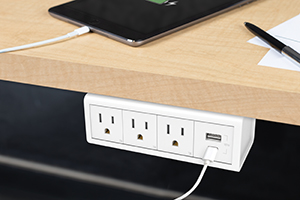
Convenience power offers the powered amenities
workers need, including outlets and USB charging.
To do this, Knott added he often sees the need to go beyond NFPA 70B recommendations in load planning, anticipating the potential uses of any space.
Beyond the office
A growing option within convenience power is floor-based power and distribution systems, though there are more installation concerns in healthcare settings.
“In the healthcare space, floor power systems face different code compliance,” Ruffy said. “Tamper resistance is something you need to provide. That’s true in common areas, too. Obviously, these systems are hospital-grade in patient spaces. We’re seeing a lot more openness toward having a floor track system. In the office, I think it’s a much more straightforward proposition. You have a reconfigurable modular option as layouts might change with some frequency. The same is true in university classrooms and common areas.“
The education market is like commercial offices in terms of needs, but the cycle of changing space layouts is a little different.
“In education, classrooms or class spaces might be reconfigured on a semester or yearly basis,” Ruffy said. “We see a higher need for modular power systems connecting three or four desks/tables in a row that can be fed from one location and then reconfigured the next day if needed, rolling classroom tables around and changing them up. With a modular power set up, you’re just remounting your power units. Modularity and flexibility are what we see driving the needs in collegiate spaces or universities, really any educational space.
“Time is money,” he added. “Contractors with design-build capability will want to understand the furniture power element, the office plan. It can’t be an afterthought.”
The desktop evolves
All the power and data infrastructure put in place must support a multifunctional work desk. So, if one of the goals is a clean desktop where everything is plugged in, the answer lies in available options.
“It’s important to recognize that people sitting at the desk are the ones driving the design of powered desk furniture,” Ruffy said. “Folks also have tablets [and] laptops, and they all need to be charged. You need supportive infrastructure at the desk and throughout the room. That’s the principle behind convenience power. The desktop is powered to accommodate employees’ needs including fast charging.”
When providing power to a modern desktop, the best configuration of outlets needs to be considered.
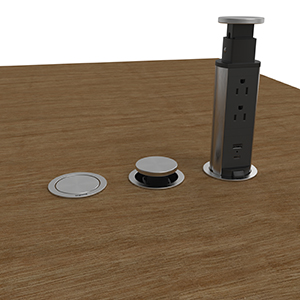
“In general, you’re going to provide power to the desktop using outlets adhered to the desktop through a clamp mount, hard mount or under-mount power like a power strip,” Ruffy said. “If it’s a sit/stand desk, you’ll likely see like an undermount strip tied to where the sit/stand motor plugs in. Wireless is becoming more prevalent, as well. Think of conference spaces and public spaces (e.g., airports, even outdoor parks, etc.). You are also seeing more pop-up outlets. Wire management and outlets today help to keep communal spaces clean, a requirement at this point.”
Today’s office desktops also feature USB-C outlets. USB-A is quickly becoming a relic, as it can only deliver 15W of power and cannot accommodate today’s faster data transfer rates. USB-C allows for fast charging (30W–65W).
“In the case of pop-up versus recessed, it is best to look at the application first, durability, frequency of access and location within the users’ space," Knott said. “If in a teaming space or board room, where aesthetics is critical, a pop-up box will provide access and convenience while still even offering some accessorial accents to the space. Inversely, in a hotel-desk or hot-desk situation where people will be coming and going, plugging in frequently and need the convenience of power at the work surface, a recessed box may be ideal as it offers ease of access and importantly, ease of maintenance of electrical components.”
The more convenience you are exposed to, the more accustomed you become.
“Powered furniture must respond when users are asking for more power and universal charging so they can leave their device chargers at home. Though the maximum for USB-C is 240W, companies are not producing products at this power level; 30W/65W/100W are the three most popular outputs we see at this stage," Ruffy said
He added that people spend something like 70%–80% of the time at their desks. While contractors may find themselves also providing power to multifunctional conference rooms, the desktop will still draw plenty of installation attention.
“The desktop is a personal space where employees get their work done,” Ruffy said. “There is an expectation that their desktop will allow them to do everything they need. They want the same accommodation that a conference space might give them to do their work properly. When you want the space to have a clean appearance, you’ll see conference spaces, public communal spaces and high-traffic hospitality locations featuring pop-up outlets.”
Managing cable management
Discreet cable management plays an equally important role in creating a clean desktop.
“Maybe you funnel the wires sort of back and around and have that outlet strip right below it for users to charge their devices such as a laptop,” Ruffy said.
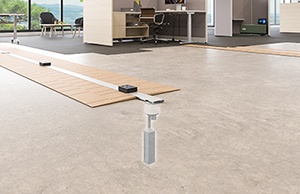
Convenience power includes prewired raceways to bring power to the desktop.
Pop-up power outlets provide a smooth surface profile.
“An installer might also use curly Q wire chases and other different wire options. You might use boxes to hide the wires,“ he said. “Sit/stand desks have cable management options. Those could include under-desk basket trays to run the wires. There are the old-fashioned zip tie and adhesive zip tie assist systems. There are plastic wire trays that you can run all the cable bundles through. Those are extremely popular.”
What’s next
The future of convenience power will be one of increased power to the desktop.
“We see convenience power dominating the office space as it continues to grow,” Ruffy said. “Currently, desks serviced by some form of convenience power account for maybe 45% of desks, and adoption will continue to grow. And while USB-C maximum design standard is 240W, we expect that to grow.”
“Driven by efficiency, the need to extend the life of our public and private electrical infrastructure, energy conservation and demand for continued operational enhancement all point to a clear need for USB outlets and workstations, floor boxes, PoE provisions planned and flexible access to these power sources,” Knott said.
“I think you will see more wireless integrated with furniture because of its charging features and power delivery,” Ruffy said. “Furniture OEMs will continue to add wireless. Wireless power on the desktop might top out at 20W for Qi2 [a type of wireless charger], but you put your phone there, and it’s always charging. Higher power 25W profiles are now appearing.
"But again, it’s lower power, wireless charging. The OEMs are integrating those features to further provide a clean profile desktop. You know the old adage: messy desk, messy mind. In some cases, you just can’t have clutter. Maybe it’s a co-working space or a hoteling situation. You have so many different people using those spaces and they change over often," he said.
An important point in any convenience power consideration is product compliance. Contractors need products that are evaluated and safe.
“There are things like water spill tests,” Ruffy said. “You don't want spilled coffee on a recessed outlet to become a shock hazard. You want convenience products that meet certified standards from UL, ANSI [and] BIFMA. Look for products that have gone through extract, transform and load testing, as well.”
In the end, the electrical contractor has some homework to do. When faced with convenience power projects, electrical wiring may take different forms, but ultimately may ease installation. Expect a panoply of feeds and outlets. Code compliance will need to be resolved. Projects with underfloor power and cabling might be new to you. Work with the manufacturers, other contractors and an IT team and a convenience power project that supports powered furniture becomes, well, convenient.
legrand
About The Author

GAVIN, Gavo Communications, is a LEED Green Associate providing marketing services for the energy, construction and urban planning industries. He can be reached at [email protected].